NeuroAtlas / Assistant
Assistant
A little curiosity. A clearer understanding.
Your conversation
Start your study session
Free, on-device AI. About 290 MB, plus runtime files.
Requirements & privacy
Requires a compatible WebGPU browser. Your questions are processed on this device. Later loads can reuse the browser's cache. Download hosts receive the requests needed to load the model.
Checking browser support…
What would you like to understand?
Explore the brain with short explanations
and sources you can follow.
Check the cited sources; AI answers can make mistakes. Shift + Enter for a new line.
Loading the anatomy sources…
Interactive anatomy
The brain, illustrated
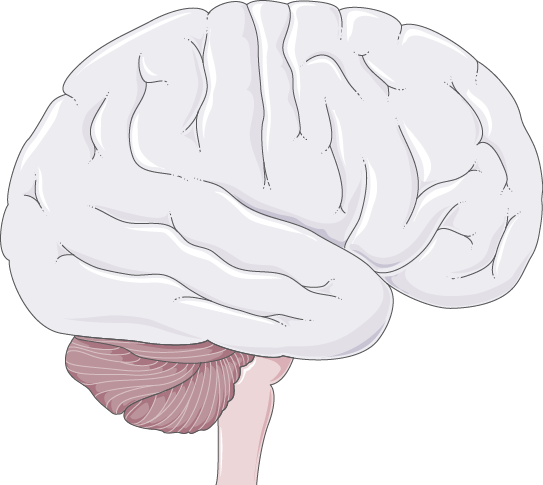
The illustration could not be loaded. Check that assets/brain.png exists and reload the page. You can still select a region from the list.
Use the slider or buttons to zoom. Scroll to explore the enlarged image. Keyboard shortcuts: +, −, and 0.
Numbered markers indicate approximate locations, not anatomical boundaries.
Source library
Start with a question.
Find passages that share words with your question, then follow their sources.
Try “balance”, “breathing”, or “visual information”. Results show original passages. Visit Assistant for generated explanations.
Search will be available once the region explanations load.
From the thesis
Three approaches to segmentation.
Explore the architectures and saved training curves from the thesis.
Loading thesis architectures and training curves…
- Input dimensions
- Output dimensions
- Parameters
Zoom with the slider or buttons, then scroll to explore. With the figure focused, use +, −, and 0.
About these thesis results
These figures document historical training runs. They do not measure the performance of the recovered final weights, and they are not a benchmark or a diagnosis.
Compare MRI examples with reference annotations and saved predictions from the recovered models.
Saved MRI examples
Compare the saved predictions.
Explore six MRI slices with their reference annotations and the saved outputs of three thesis models.
Educational examples. Training overlap is unknown: these samples may have appeared in model training. These results do not establish performance on new patients and are not suitable for diagnosis.
Loading the comparison examples…
Choose an MRI sample to view the saved overlays.
Zoom with the controls. Focus the image viewer to use +, −, or 0; use the arrow keys or scroll to explore.
- Reference only
- Prediction only
- Both masks overlap
When one overlay is hidden, its remaining visible counterpart uses its own color across the whole mask.
Selected slice
- Dice
- —
- IoU
- —
- Predicted pixels
- —
- Reference pixels
- —
Across the full dataset
- Mean patient Dice
- —
- Mean patient IoU
- —
- Positive-slice Dice
- —
- Empty slices with false positives
- —
Dice and IoU measure mask overlap; 1 is perfect agreement. When both masks are empty, Dice and IoU are 1 by convention. Positive-slice Dice excludes slices whose reference mask is empty. Patient scores pool pixel counts across the supplied slices within each patient, then give each patient equal weight. Empty slices are also reported separately.
Read these as examples
The six displayed slices are a small selection, not a representative clinical evaluation.
These are saved results. This page does not run the segmentation models or accept MRI uploads.
MRI images and annotations: LGG MRI Segmentation dataset by Mateusz Buda, version 2, using data from The Cancer Imaging Archive. Adapted image assets are shared under CC BY-NC-SA 4.0 for noncommercial use with attribution and ShareAlike. Changes: FLAIR-channel extraction, PNG conversion, binary prediction masks at a strict > 0.5 threshold, and colored viewer overlays; no spatial cropping or rescaling. Buda, Saha & Mazurowski (2019). Asset credits and changes.
On this device
Explore a prediction on your MRI slice.
Choose a prepared MRI slice and run one of the recovered models in your browser. Images and predictions stay in browser memory; they are not sent to a server.
Educational use only, not for diagnosis. Performance on new patients is unknown. A prediction, including an empty mask, cannot establish the presence or absence of an abnormality.
1. Load one model
MRI weights are not included in this website. Choose the matching verified ONNX file before loading a model. The browser runtime loads from a CDN only after you press Load model.
Choose a verified ONNX model file
On the public website, a matching model file from your computer is required. Its size and SHA-256 fingerprint are checked in your browser. Other ONNX models are not supported, and the selected file is never uploaded.
Select an architecture to see its expected fingerprint.
No MRI model loaded. Choose a model, then load it when you are ready.
No MRI weights are distributed by this site. You can explore saved comparisons without a model file, or read about local model access.
2. Choose a prepared MRI slice
Use native 256 × 256, 8-bit, opaque PNG images, at most 4 MiB each, without color profiles. No resizing, cropping, or automatic medical-image conversion is performed.
All supplied modalities must show the same registered slice. Each missing optional modality is replaced with the FLAIR image; this substitution changes the model input.
Red = pre-contrast, green = FLAIR, blue = post-contrast, from one registered MRI slice. This is a modality stack, not an ordinary color photograph.
Choose a FLAIR image to preview the input.
Preparing an image from DICOM, NIfTI, or TIFF
These formats are not accepted here. Use a medical-image viewer or your established research preprocessing workflow to select the same slice across registered pre-contrast, FLAIR, and post-contrast volumes. Export opaque 8-bit grayscale PNGs at the model's native 256 × 256 size, preserving orientation and alignment. A screenshot, resized scan, or arbitrary color image is not an equivalent input.
If you only have a FLAIR export, use FLAIR mode and leave the other modalities empty; the interface explicitly reports their substitution. Do not share patient identifiers. This tool cannot verify acquisition, registration, or suitability for clinical use.
Your FLAIR preview will appear here.
No image selected.
Focus this viewer to use +, −, or 0 for zoom; use arrow keys or scroll to explore. Zoom changes the display only.
Browser session
- Model used
- Not loaded
- Requested / actual compute
- —
- Model source
- —
- Prediction time
- —
- Marked pixels
- —
- Fixed mask threshold
- Strictly > 0.5
No input prepared.
Automatic compute tries WebGPU first and can fall back to WebAssembly on the CPU. WebGPU sessions may also run some operations on the CPU.
The download contains only the native 256 × 256 binary mask: white for probability strictly greater than 0.5, black otherwise.
Read the mask cautiously
Educational output, not a diagnosis. New-patient performance is unknown. Marked pixels are a model prediction; an empty mask does not rule out an abnormality. There is no reference annotation for your image, so accuracy and overlap scores cannot be established here.
Enable local model access
From the NeuroAtlas folder, restart the local server with python scripts/serve.py --enable-local-mri, then reload this page. This allows the browser to read the private model files installed locally. The model weights are not included in the website's public files.
If you use static hosting, choose an exact verified ONNX file from your computer instead. Loading still needs access to the browser runtime from its CDN. Choosing a file never uploads it.
Sources & attribution
Follow the explanation
back to its source.
Questions and selected MRI files are processed in your browser. Model downloads and ordinary page requests contact their hosting providers. Read the privacy and device-use information.
Image: Servier Medical Art — Brain, provided by Les Laboratoires Servier under the Creative Commons Attribution 4.0 license. Numbered location markers are a NeuroAtlas overlay; the original image file is unchanged.
Text references
Source: National Library of Medicine; National Institutes of Health; U.S. Department of Health and Human Services. Anatomy passages are independently worded summaries of the linked sources. No institutional endorsement is implied.